Anthropic's Claude Managed Agents (CMA) supports a self-hosted mode. Claude keeps running the agent loop and reasoning on its side, while every tool call the agent makes (bash commands, file edits, code execution) runs inside infrastructure you control. The agent's filesystem, processes, and network egress stay within your boundary.
This guide walks through making InstaVM that execution layer. By the end, you'll have a public webhook endpoint registered with Anthropic and a fresh, isolated InstaVM microVM that starts for every agent session.
One design decision is central to this setup: the sandbox that runs untrusted agent code never holds a real API key. Third-party credentials are injected at the egress boundary from a vault, so the worker only ever sees placeholder strings. The sections below explain why.
The full source for this guide lives in the `claude-managed-agents` cookbook.
How CMA self-hosting works
A self-hosted environment is a work queue. When a session is assigned to it, Anthropic enqueues the session as a work item. You run a worker that claims work items, downloads the agent's skills, executes the tool calls, and posts the results back. Anthropic handles reasoning and orchestration; your worker handles execution.
There are two ways to trigger the worker:
- Always-on: a process that polls the queue continuously. Simple, but it consumes resources while idle.
- Webhook-triggered: Anthropic calls your webhook on
session.status_run_started, and you start a worker on demand.
This guide builds the webhook-triggered version. It has two components:
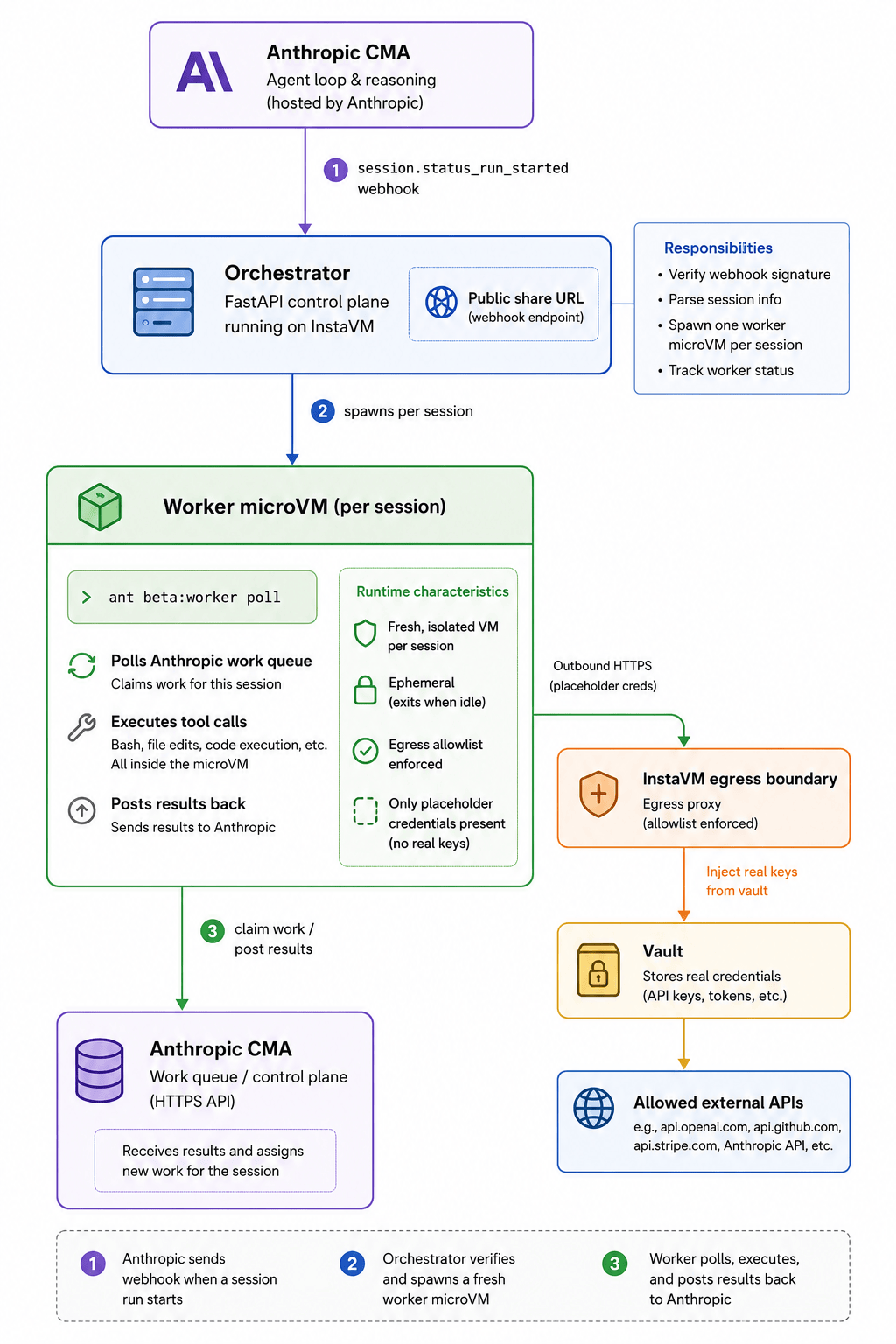
- An orchestrator: a long-lived InstaVM service with a public URL. It receives the webhook, verifies the signature, and spawns a worker.
- A worker microVM: a short-lived, isolated VM created fresh for each
session. It runs
ant beta:worker poll, drains the queue, executes tools, and exits when the session goes idle.
Why we inject credentials at the egress boundary
The worker needs an Anthropic environment key to authenticate to the work queue, and the agent often needs third-party API keys (OpenAI, Stripe, GitHub, and others) to perform useful work.
The common approach is to place those secrets inside the sandbox, as environment
variables or files on disk. But the sandbox is exactly where untrusted,
agent-generated code runs. A prompt injection, a buggy tool call, or a malicious
dependency then sits on the same filesystem as your credentials, where a single
cat ~/.config/* is enough to exfiltrate them.
InstaVM routes every VM's outbound HTTPS through an egress proxy. You bind a
vault that maps a host (for example, api.openai.com) to a credential, and the
proxy substitutes the real value into the request at TLS write time. Your code
ships a placeholder:
OPENAI_API_KEY = "OPENAI_KEY" # placeholder string, never the real secretThe real key appears only on the wire, outside the VM. The agent can read every file and dump every environment variable, and find nothing sensitive.
| Secrets-in-sandbox (typical) | InstaVM egress injection | |
|---|---|---|
| Where the key lives | Env var / file in the worker | Vault, outside the VM |
| Agent code can read it | Yes | No |
| Blast radius of a prompt injection | All bound credentials | Nothing on disk |
A note on the Anthropic environment key specifically: it is a scoped, revocable, queue-only credential that can claim work for a single environment, not your full account. You can inject it at egress like any other host credential, or pass it to the worker directly. The third-party provider keys are the ones most worth keeping out of the sandbox, and this guide keeps all provider credentials out of the worker.
1. Prerequisites
# Anthropic API key (creates environments/agents/sessions from your host).
export ANTHROPIC_API_KEY="sk-ant-..."

# InstaVM CLI + SDK, authenticated.
pip install instavm
instavm auth login

# The ant CLI is installed inside the worker microVM, not here.
2. The orchestrator
The orchestrator is a small FastAPI app. Deployed as an InstaVM service, it
receives a public share URL that we register with Anthropic. It exposes four
routes: / (a status page), /health, /workers, and /webhook.
Verifying the webhook
Anthropic signs every delivery with the Standard Webhooks scheme using a
whsec_-prefixed signing key. The simplest verification is the Anthropic SDK's
unwrap() helper, which checks the signature and rejects any payload older than
five minutes:
import anthropic

client = anthropic.Anthropic()  # reads ANTHROPIC_WEBHOOK_SIGNING_KEY from env

def verify(body: str, headers: dict) -> dict:
    # Raises if the signature is invalid or the payload is stale.
    return client.beta.webhooks.unwrap(body, headers=headers)
The cookbook also ships a small, dependency-free HMAC fallback so verification
stays unit-testable offline. Verification fails closed: if the signing key
isn't configured, the endpoint returns 503 rather than trusting the payload.
The webhook handler
from fastapi import FastAPI, Request
from fastapi.responses import JSONResponse

app = FastAPI()

@app.post("/webhook")
async def webhook(request: Request) -> JSONResponse:
    body = await request.body()
    try:
        payload = verify_and_parse(body, request.headers, signing_key)
    except WebhookError as exc:
        return JSONResponse({"error": str(exc)}, status_code=400)

    event_type, session_id = extract_session_event(payload)
    if event_type != "session.status_run_started":
        return JSONResponse({"ok": True, "ignored": event_type})

    # Return 200 immediately; spawn the worker out of band.
    dispatcher.schedule(session_id)
    return JSONResponse({"ok": True, "scheduled": session_id})
The handler returns 200 immediately and schedules a background task. The
dispatcher debounces briefly, so a burst of near-simultaneous webhooks collapses
into a single spawn per session.
3. Spawning a worker microVM
This is the core of the integration. For each session, the orchestrator creates a fresh InstaVM microVM, restricts its egress to an allowlist, and starts the poller. The environment key handed to the VM is a placeholder; the real value is injected at egress:
from instavm import InstaVM

def spawn_worker(session_id: str) -> str:
    env = {
        "ANTHROPIC_ENVIRONMENT_ID": ENVIRONMENT_ID,
        "ANTHROPIC_ENVIRONMENT_KEY": "ANTHROPIC_ENV_KEY",  # placeholder
        "ANTHROPIC_SESSION_ID": session_id,
    }
    vm = InstaVM(
        api_key=INSTAVM_API_KEY,
        memory_mb=2048,
        cpu_count=2,
        env=env,
        metadata={"cma_session_id": session_id, "role": "cma-worker"},
    )

    # Restrict outbound traffic to Anthropic's control plane (+ any hosts the
    # agent legitimately needs). Everything else is blocked at the boundary.
    vm.set_session_egress(
        allow_package_managers=True,
        allowed_domains=["api.anthropic.com"],
    )

    # Fire-and-forget: the poller runs until the session goes idle, then exits.
    vm.execute_async(WORKER_BOOTSTRAP)
    return vm.session_id
The worker bootstrap installs the ant CLI (once) and hands control to the
poller:
set -e
mkdir -p /workspace
if ! command -v ant >/dev/null 2>&1; then
  ARCH=$(uname -m | sed -e 's/x86_64/amd64/' -e 's/aarch64/arm64/')
  curl -fsSL "https://github.com/anthropics/anthropic-cli/releases/download/v1.12.0/ant_1.12.0_linux_${ARCH}.tar.gz" \
    | tar -xz -C /usr/local/bin ant
fi
exec ant beta:worker poll --workdir /workspace --max-idle 30s
ant beta:worker poll claims the session's queued work, downloads skills into
/workspace, executes the agent's bash and file tools inside the microVM, posts
results back to Anthropic, and shuts down after it's been idle for --max-idle.
Because the vault is bound to api.anthropic.com, the egress proxy swaps the
placeholder for the real environment key on the outbound request. The VM never
stores it.
Faster cold starts: instead of installing
antat boot, bake a snapshot with it pre-installed and create the worker from that snapshot. The first run downloadsant; every run after is instant.
4. Package it as an InstaVM service
InstaVM cookbooks are described by an instavm.yaml manifest. The key blocks are
app (the service port and health check), vault (the host whose credential is
injected at egress), and egress (the outbound allowlist):
schema_version: 2
kind: service
slug: claude-managed-agents
runtime: python-fastapi
app:
  port: 8000
  healthcheck_path: /health
  share_public_default: true     # gives us the public webhook URL
run:
  start_command: python -m uvicorn app:app --host 0.0.0.0 --port 8000
vault:
  required: true
  hosts:
    - api.anthropic.com          # real key injected at egress on the workers
egress:
  mode: allowlist
  include_vault_hosts: true
  allowed_domains:
    - api.anthropic.com
secrets:
  - name: AnthropicWebhookSigningKey
    prompt: Anthropic webhook signing key (whsec_...)
    env_name: ANTHROPIC_WEBHOOK_SIGNING_KEY
  - name: AnthropicEnvironmentId
    prompt: Self-hosted environment id (env_...)
    env_name: ANTHROPIC_ENVIRONMENT_ID
The manifest is a convenience. It declares the same app.py, egress rules, and
vault binding you would otherwise wire by hand, so that instavm deploy
reproduces them every time.
5. Deploy and register
git clone https://github.com/instavm/cookbooks.git
cd cookbooks/claude-managed-agents

# Bind the vault so workers get the real Anthropic environment key at egress.
# The worker authenticates to the work queue with a Bearer token, so the
# binding is: host api.anthropic.com, auth_type=bearer, credential ANTHROPIC_ENV_KEY.
instavm vault setup .

# Deploy the orchestrator. Prompts for the webhook signing key and environment id,
# then prints the public share URL it provisioned. Copy it; this is your <share-url>.
instavm deploy .
# → Service live at: https://<share-url>   (e.g. https://claude-managed-agents-xxxx.instavm.site)

# Confirm it's live (and that <share-url> is the one deploy printed above).
curl https://<share-url>/health
# {"ok": true, "slug": "claude-managed-agents", "active_workers": 0, ...}
Throughout the rest of this guide,
is the public URL thatinstavm deployprinted when it provisioned the service. The webhook Anthropic calls lives under it.
Create the self-hosted environment
You can do this from the API:
curl -sS https://api.anthropic.com/v1/environments \
  -H "x-api-key: $ANTHROPIC_API_KEY" \
  -H "anthropic-version: 2023-06-01" \
  -H "anthropic-beta: managed-agents-2026-04-01" \
  -H "content-type: application/json" \
  -d '{"name":"instavm","config":{"type":"self_hosted"}}'
# → {"id":"env_...", ...}
Then, in the Claude Console,
open the environment and click Generate environment key (this step is
Console-only). Note the env_... id for the deploy prompt.
Register the webhook
In the Console under Manage → Webhooks, add an endpoint. The URL is the
instavm deploy printed earlier, with /webhook appended:
URL:        https://<share-url>/webhook
Subscribe:  session.status_run_started   (this event only)
Copy the whsec_... signing key it shows you (it is shown only once) and
re-deploy so the orchestrator can verify deliveries.
Create an agent
ant beta:agents create <<'YAML'
name: InstaVM Assistant
model: claude-sonnet-4-6
system: You are a helpful assistant.
tools:
  - type: agent_toolset_20260401
YAML
agent_toolset_20260401 gives the agent the built-in bash and file tools it runs
inside the worker.
6. Run a session
Create a session against that agent and environment, then send a simple message for the first smoke test:
ant beta:sessions create --agent <agent-id> --environment-id <env-id> --title "smoke"
ant beta:sessions:events send --session-id <session-id> \
  --event '{type: user.message, content: [{type: text, text: "Use bash to echo it-works. Answer only with that text."}]}'
Anthropic fires the webhook, the orchestrator spawns a worker microVM, and the
poller runs the echo inside the VM. The worker opens the session's event stream,
executes the agent's pending tool calls in the microVM, and posts the results
back. Each of those requests authenticates with the environment key the egress
proxy injected. Check the worker status:
curl https://<share-url>/workers
# {"workers":[{"session_id":"sess_...","status":"running","vm_id":"...","age_seconds":2.1}]}
A healthy run ends with the session back at session.status_idle and the worker
microVM exiting on its idle timeout.
What you've built
- Anthropic owns the loop. Reasoning, planning, and orchestration stay on Claude's side. You provide only the execution sandbox.
- Per-session isolation. Every agent session gets a fresh microVM with its own filesystem and an egress allowlist. Nothing bleeds between sessions.
- No secrets in the sandbox. Provider credentials are injected at the egress boundary from the vault. The worker, where untrusted agent code runs, never holds them.
To give the agent access to another API, add the host to the worker's egress allowlist and bind a vault credential for it. The same pattern applies to every provider: a placeholder inside the sandbox, the real key injected at the edge. The agent can complete its work, while your secrets never sit on a disk it can read.
The cookbook ships with an offline test suite that asserts exactly this. The
integration is real and runs end to end; the test swaps the live InstaVM SDK for
an in-memory stub so it can verify, without spinning up a VM, that the worker is
only ever handed placeholder credentials. Clone the cookbook, run pytest, and
build from there.